On this page, you can find some tips and tricks that will make working with Schematicals even more enjoyable. Possibilities you didn't know, some keyboard-mouse combinations that will speed up the work,...
In the fuse box, it is possible to copy a earth leakage circuit breaker or automatic switch and paste it in the same fuse box. Not only the characteristics are copied, but also the upstream connection. This copy-paste can be done via the menu behind the right mouse button, but can also be done faster by means of the button combination CTRL-C (copy) and CTRL-V (paste). Since version 1.007, the shortcut keys CRTL-Z (Undo) and CRTL-Y (Redo) have also been activated. But the CTRL key makes working with Schematicals even easier in other ways:
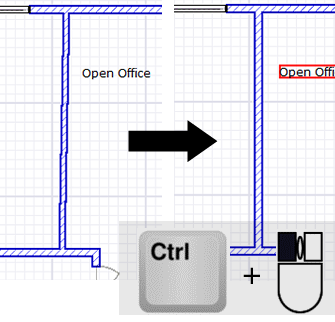
When drawing walls, structures, connections,... you can easily draw fully horizontal or vertical lines by means of the CTRL key
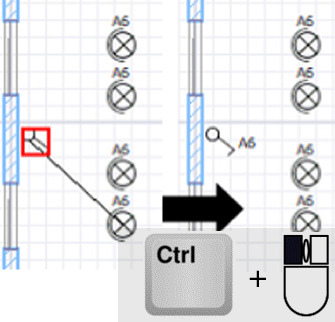
By dragging the cursor with the mouse along with the CTRL key from a selected switch to a light ring assigned to a power rail, this switch is linked to this light ring
You can select multiple light points with the mouse in combination with the CTRL key and place them on 1 circuit. This way you can easily create a shared circuit.
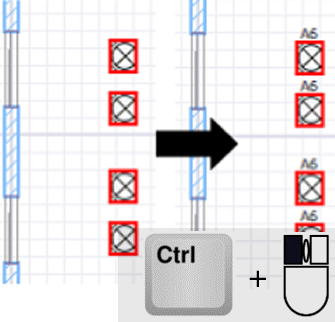
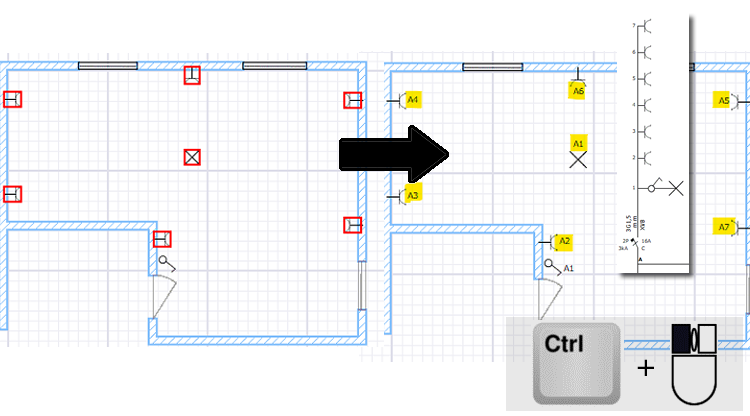
By means of a selection with the mouse button in combination with the CTRL key, you can also select outlets, devices,... together and assign them to one circuit in 1 movement from version 1.009. These components are then placed on the circuit in the order of selection
Do you have a fixed routine when assembling a new installation? Do you place the washing machine on ring M, the dryer on ring N,... with each installation? Then you can accelerate these projects by creating a sample project once, in which only the fuse box is assembled, and then starting the following projects as a copy of the sample project. This saves you time because you only need to make a few small changes to the composition of the fuse box in this new project. You can then immediately start drawing the installation on the floor plan and the situation diagram.
When you have to draw an existing installation and the machines in the distribution box are already labeled but the labeling is not continuous. Are the machines for example labeled with A, B, C, F, G, H..? Because the labeling in Schematicals runs automatically, when drawing the installation the labeling is created continuously. To prevent this, you can place machines D and E in the distribution box without connecting them to another component. This way, these machines are not drawn on the single-line diagram but the labeling of the other machines will be interrupted, as in the real situation.
From version 1.029 it is also possible to manually adjust the automatic naming of an automatic switch to a name of your choice. This way, you can deviate from the alphabetical naming and also give names like "REM" and "PV" to an automatic switch, but also set up interrupted labeling.