On this page, you can find the problems reported by customers with downloading and/or installing Schematicals. If you do not find the solution to your problem here, do not hesitate to report it to us.
Report a new problem
If you want to download the Schematicals installation file via Microsoft Edge (browser):
After clicking the Download button above, the installation file is downloaded. At the top right in Edge, the download notification appears. In some cases, a warning may appear with the message that the download cannot be performed or with the message that you must first indicate that you trust the SchematicsInstaller.msi file (see figure below).
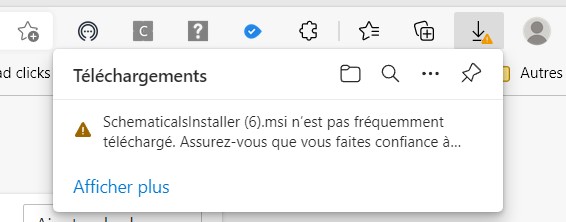
When you move your mouse over this notification, you can open a drop-down menu via the three dots (...) where you can choose to "Keep" the file.
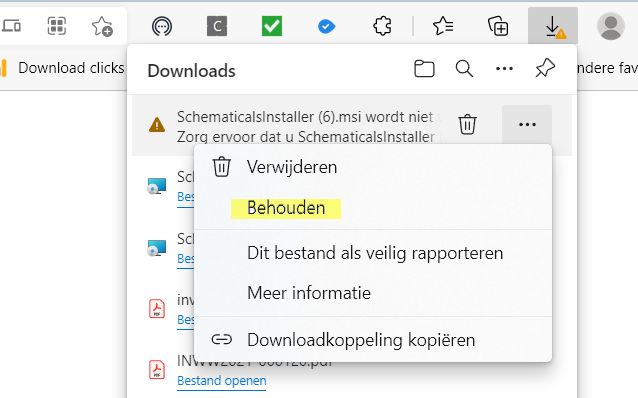
Once you have clicked on keep, the following window will open.
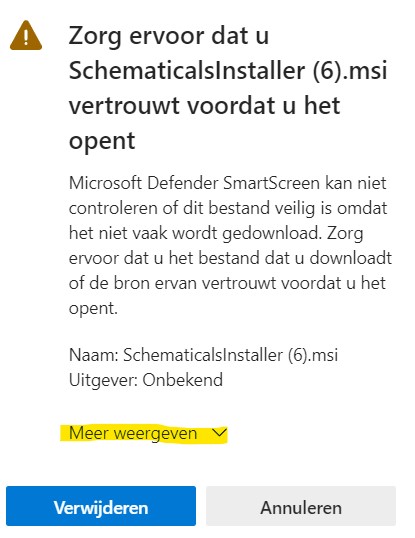
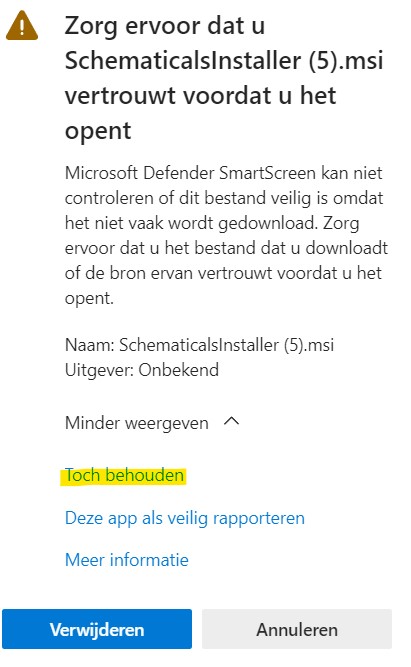
Click on the link "Show more" at the bottom of this window. At the bottom, you will then have the option to choose "Keep anyway". Once you click on "Keep anyway", the download will be executed.
Some security programs will give a warning when downloading the installation file, running the installation file, and/or starting Schematicals. These warnings can be ignored. Read more about it in our manual.
ManualIt is possible that Windows will give the following message when installing:
"The system administrator has set up the system in such a way that this installation cannot be performed."
This can be solved by disabling the Smart App Control function. To do this, go to "Settings" and follow the path below.
Settings -> Privacy and security -> Windows Security -> App and browser control -> Smart App Control -> Here you can disable Smart App Control.
In exceptional cases, the installation of Schematicals fails because a dll file could not be found. This is a dll file that is normally present on every Windows computer. If this problem occurs, it is best to install the latest Windows updates and possibly all Service Packs.
How to update WindowsAfter installing a new version over an old version, it appears that in some cases the version has not been updated and Schematicals always opens with the "old" version. This is because the browser has not downloaded the file from the website but from the browser's memory (cache). This can be solved by clearing this memory. How to do this depends on the browser used. On the following website you can find a manual for the different browsers.
Cache memory knowWith some browsers, downloading a file happens earlier in the background and it is not always clear if the download was successful. In case of the Edge browser, you get a notification at the top right of your screen that the download is starting (or a notification that the file would not be safe, see above for that). Unless set otherwise, all downloaded files are placed in your "Download" folder (usually on the C drive of your PC: C:\Users\User with "User" your username on the PC).